
ActiveCaptain®45.1 - App Store
Sie können Ergebnisse sehen in einige Sekunden.
Herausgeberbeschreibung



Die kostenlose ActiveCaptain-App schafft eine einfache und leistungsstarke Verbindung zwischen deinem kompatiblen Mobilgerät und deinem Garmin-Kartenplotter,Karten und der Bootsfahrer-Community. Ganz gleich, ob du Garmin-Produkte für das Cruising, Angeln, Segeln oder Tauchen verwendest, diese Universal-App hilft dir dabei, deine Zeit auf dem Wasser zu genießen.
Kopple die App mit deinem kompatiblen Kartenplotter, um Karten, Updates, Routen, Wegpunkte und Feedback von der ActiveCaptain-Community drahtlos zu übertragen und darauf zuzugreifen. Wenn du das OnDeck Hub (1) erwirbst, kannst du dein Boot fast überall verfolgen und überwachen.
Das ultimative vernetzte Erlebnis an Bord beginnt hier mit umfangreichen Funktionen.
Bitte beachte, dass diese App nicht für Besitzer von Kartenplottern empfohlen wird, die nicht von Garmin stammen, und sie sollte nicht als eigenständige Navigations-App verwendet werden.
VERFÜGBARE FUNKTIONEN:
- ONECHART:
> Erwirb Seekarten auf deinem Mobilgerät und erstelle eine Karte für deinen registrierten Garmin-Kartenplotter . Profitiere von einer ausgezeichneten Abdeckung, Klarheit und Detailtreue der Karten, die Daten von Garmin und Navionics® vereinen. Außerdem können NOAA-Rasterkarten (2) kostenlos über die ActiveCaptain-App heruntergeladen werden.
> Greife mit der ActiveCaptain-App von nahezu überall aus auf Karten zu und aktualisiere sie. Übertrage siedrahtlos auf deinen Garmin-Kartenplotter, wenn du das nächste Mal auf dem Wasser bist.
- ROUTENPLANUNG: Plane deine Route oder suche online nach einem neuen Angelplatz, bevor du überhaupt auf dem Wasser bist. Übertrage die Daten dann auf deinen Kartenplotter, wo du dir Routen und Wegpunkte anzeigen lassen kannst.
- BENUTZERDATENSYNCHRONISIERUNG: Sichere und synchronisiere Daten auf deinem Kartenplotter und in der ActiveCaptain-App – ganz automatisch.
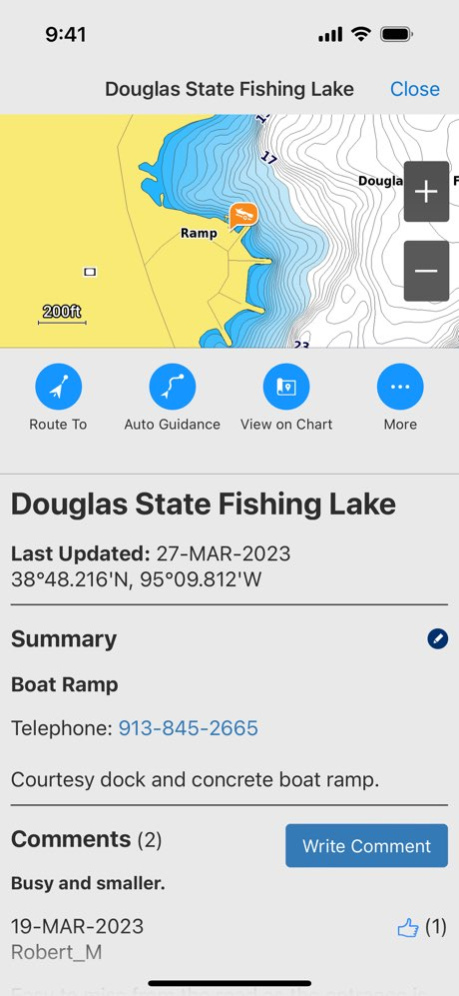
- ACTIVECAPTAIN-COMMUNITY: Tritt einer Community gleichgesinnter Bootsfahrer bei, um aktuelles Feedback zu Jachthäfen, Slipanlagen und anderen POIs (Point of Interest) zu erhalten. Lies Bewertungen und sieh dir Bilder vieler POIs an, um auf dem Wasser fundierte Entscheidungen zu treffen. Außerdem kannst du zur Community beitragen, indem du POIs, Rezensionen und Bilder von deinem kompatiblen Mobilgerät hinzufügst.
- KARTENPLOTTERBEDIENUNG: In die ActiveCaptain-App ist die Helm™-Funktion integriert, damit du deinen kompatiblen (3) Kartenplotter über dein Smartphone oder Tablet anzeigen und bedienen kannst – auch wenn jemand anders gerade den Plotter bedient (4).
- ONDECK HUB (1): Verwende die ActiveCaptain-App, um dein OnDeck-System von nahezu überall aus zu überwachen und zu bedienen. Eine Tür ist auf? SMS-Alarme und Benachrichtigungen sorgen für mehr Sorgenfreiheit.
- QUICKDRAWTM-COMMUNITY: Benötigst du mehr Tiefendetails für deinen nächsten Angelausflug? Lade aktuelle HD-Karten mit Tiefenlinien von 30 cm (1 Fuß) herunter, die von anderen Bootsfahrern geteilt wurden. Synchronisiere sie dann mit deinem Kartenplotter. Du kannst auch problemlos deine eigenen Quickdraw Contours hochladen.
- SMART NOTIFICATIONS (4): Verbinde die App mit dem Kartenplotter und aktiviere Smart Notifications, um Anrufe, SMS-Nachrichten und mehr auf dem Kartenplotter zu sehen, während dein Telefon sicher verstaut ist.
FUSSNOTEN
1) Das OnDeck Hub ist separat erhältlich. Außerdem ist ein aktives Abonnement erforderlich.
2) NOAA-Rasterkarten können nicht auf echoMAP CHIRP- und ECHOMAP Plus-Kombigeräten angezeigt werden. Dies ist jedoch über die ActiveCaptain-App auf Mobilgeräten möglich.
3) Helm ist nicht mit Kartenplottern der ECHOMAP-Serie kompatibel.
4) Überprüfe die Gerätekompatibilität auf der Webseite für die ActiveCaptain-App; besuche "Garmin.com" > "Marine" > "App".
End User License Agreement: https://www.garmin.com/en-US/legal/marine-mobile-eula/
Über ActiveCaptain®
Das Unternehmen, das ActiveCaptain® entwickelt, ist Garmin. Die neueste vom Entwickler veröffentlichte Version ist 45.1.
Um ActiveCaptain® auf Ihrem iOS-Gerät zu installieren, klicken Sie einfach auf die grüne Schaltfläche Weiter zur App oben, um den Installationsvorgang zu starten. Die App ist seit 2026-10-27 auf unserer Website gelistet und wurde 0 Mal heruntergeladen. Wir haben bereits geprüft, ob der Download-Link sicher ist; zu Ihrem eigenen Schutz empfehlen wir jedoch, die heruntergeladene App mit Ihrem Antivirusprogramm zu scannen. Ihr Antivirusprogramm kann ActiveCaptain® als Malware erkennen, wenn der Download-Link defekt ist.
So installieren Sie ActiveCaptain® auf Ihrem iOS-Gerät:
- Klicken Sie auf unserer Website auf die Schaltfläche Weiter zur App. Dadurch werden Sie zum App Store weitergeleitet.
- Sobald ActiveCaptain® im iTunes-Eintrag Ihres iOS-Geräts angezeigt wird, können Sie den Download und die Installation starten. Tippen Sie rechts neben der App auf die Schaltfläche LADEN, um den Download zu starten.
- Wenn Sie nicht in der iOS App Store App angemeldet sind, werden Sie nach Ihrer Apple-ID und/oder Ihrem Passwort gefragt.
- Nachdem ActiveCaptain® heruntergeladen wurde, sehen Sie rechts einen INSTALLIEREN-Button. Tippen Sie darauf, um die eigentliche Installation der iOS-App zu starten.
- Sobald die Installation abgeschlossen ist, können Sie auf die Schaltfläche ÖFFNEN tippen, um sie zu starten. Das Symbol wird außerdem zum Startbildschirm Ihres Geräts hinzugefügt.
Programmdetails
Systemanforderungen
Download-Informationen
Preisgestaltung
Versionsgeschichte
Version 45.1
veröffentlicht am 2026-10-27
Fehlerbehebung und Optimierung
Version 45.0
veröffentlicht am 2026-10-15
Version History Bug fixing and optimization 45.0 Sep 28 Bug fixing and optimization 44.0 Jun 25 - Improved chart handling: The lake level can now be set independently from the vessel position
- Bug fixing and optimization 43.0 Apr 1 - Improved device registration workflow
- Bug fixing and optimization 42.0 Jan 7 Bug fixing and optimization 41.0 10/22/2025 Bug fixing and optimization 40.1 08/20/2025 - OnDeck now displays sensor data for up to 10 years and allows to view two sensors on the same graph
- Bug fixing and optimization 40.0 06/25/2025 Bug fixes and performance improvements 39.0 04/02/2025 - Auto Guidance+™ improvements by sorting and grouping hazards along the route
- Bug fixing and optimization 38.0 01/08/2025 Bug fixing and optimization 37.1 10/22/2024 - View seabed areas in an updated color palette along with details about the nature of the sea floor such as sand, mud, rock or vegetation. Seabed areas menu option will display only where seabed area content exists. Look for new seabed areas content coming for European coverage areas
- Bug fixing and optimization 37.0 10/07/2024 - ActiveCaptain can now receive a point of interest or position from other apps
- Text display improvements in the map view
- Bug fixes and performance improvements 36.1 07/16/2024 - Positions or POIs marked in 'Google Maps' or 'Apple Maps' can now be shared with ActiveCaptain and displayed in the app
- Text display improvements in the map view
- Bug fixes and performance improvements 36.0 07/01/2024 Bugfixes and performance improvements 35.1 04/29/2024 - New 'Vessel Settings' menu
- Enhanced Telematics functionality (Battery Monitoring, Sensor Graphs for Engine Data)
- Bugfixes and performance improvements 35.0 04/08/2024 - Updated UI
- Bugfixes and performance improvements 34.0 01/09/2024 - Auto Guidance routing has been optimized.
- Improvements with data transfer to Garmin marine devices.
- The app icon and splash screen can now be configured to match the vessel manufacturer.
- Various improvements for alarms and sensor data (Telematics).
- Bug fixes and performance improvements. 33.0 10/16/2023 - Bugfixes and performance improvements 32.1 07/13/2023 - Software updates can now be downloaded while being connected to chartplotter Wi-Fi
- Bugfixes and performance improvements 32.0 07/07/2023 - Bugfixes and performance improvements 31.1 05/16/2023 Bugfixes and performance improvements 31.0 04/11/2023 - Software updates can now be downloaded while being connected to chartplotter Wi-Fi
- Bugfixes and performance improvements 30.0 01/11/2023 Bugfixes and performance improvements 29.0 09/28/2022 Bugfixes and performance improvements 28.0 06/27/2022 Now you can track, monitor and control any number of switches you need on the vessel via the OnDeck system within the ActiveCaptain® app.
> Supports third party digital switching interfaces with offboard switch control via the ActiveCaptain® app.
Auto Download Setting – This is a new setting that lets you enable automatic downloads of marine device software updates. 27.0 04/11/2022
Version 45.0
veröffentlicht am 2026-10-01
Version History Bug fixing and optimization 45.0 3d ago Bug fixing and optimization 44.0 Jun 25 - Improved chart handling: The lake level can now be set independently from the vessel position
- Bug fixing and optimization 43.0 Apr 1 - Improved device registration workflow
- Bug fixing and optimization 42.0 Jan 7 Bug fixing and optimization 41.0 10/22/2025 Bug fixing and optimization 40.1 08/20/2025 - OnDeck now displays sensor data for up to 10 years and allows to view two sensors on the same graph
- Bug fixing and optimization 40.0 06/25/2025 Bug fixes and performance improvements 39.0 04/02/2025 - Auto Guidance+™ improvements by sorting and grouping hazards along the route
- Bug fixing and optimization 38.0 01/08/2025 Bug fixing and optimization 37.1 10/22/2024 - View seabed areas in an updated color palette along with details about the nature of the sea floor such as sand, mud, rock or vegetation. Seabed areas menu option will display only where seabed area content exists. Look for new seabed areas content coming for European coverage areas
- Bug fixing and optimization 37.0 10/07/2024 - ActiveCaptain can now receive a point of interest or position from other apps
- Text display improvements in the map view
- Bug fixes and performance improvements 36.1 07/16/2024 - Positions or POIs marked in 'Google Maps' or 'Apple Maps' can now be shared with ActiveCaptain and displayed in the app
- Text display improvements in the map view
- Bug fixes and performance improvements 36.0 07/01/2024 Bugfixes and performance improvements 35.1 04/29/2024 - New 'Vessel Settings' menu
- Enhanced Telematics functionality (Battery Monitoring, Sensor Graphs for Engine Data)
- Bugfixes and performance improvements 35.0 04/08/2024 - Updated UI
- Bugfixes and performance improvements 34.0 01/09/2024 - Auto Guidance routing has been optimized.
- Improvements with data transfer to Garmin marine devices.
- The app icon and splash screen can now be configured to match the vessel manufacturer.
- Various improvements for alarms and sensor data (Telematics).
- Bug fixes and performance improvements. 33.0 10/16/2023 - Bugfixes and performance improvements 32.1 07/13/2023 - Software updates can now be downloaded while being connected to chartplotter Wi-Fi
- Bugfixes and performance improvements 32.0 07/07/2023 - Bugfixes and performance improvements 31.1 05/16/2023 Bugfixes and performance improvements 31.0 04/11/2023 - Software updates can now be downloaded while being connected to chartplotter Wi-Fi
- Bugfixes and performance improvements 30.0 01/11/2023 Bugfixes and performance improvements 29.0 09/28/2022 Bugfixes and performance improvements 28.0 06/27/2022 Now you can track, monitor and control any number of switches you need on the vessel via the OnDeck system within the ActiveCaptain® app.
> Supports third party digital switching interfaces with offboard switch control via the ActiveCaptain® app.
Auto Download Setting – This is a new setting that lets you enable automatic downloads of marine device software updates. 27.0 04/11/2022
Version 44.0
veröffentlicht am 2026-09-24
Version History Bug fixing and optimization 44.0 Jun 25 - Improved chart handling: The lake level can now be set independently from the vessel position
- Bug fixing and optimization 43.0 Apr 1 - Improved device registration workflow
- Bug fixing and optimization 42.0 Jan 7 Bug fixing and optimization 41.0 10/22/2025 Bug fixing and optimization 40.1 08/20/2025 - OnDeck now displays sensor data for up to 10 years and allows to view two sensors on the same graph
- Bug fixing and optimization 40.0 06/25/2025 Bug fixes and performance improvements 39.0 04/02/2025 - Auto Guidance+™ improvements by sorting and grouping hazards along the route
- Bug fixing and optimization 38.0 01/08/2025 Bug fixing and optimization 37.1 10/22/2024 - View seabed areas in an updated color palette along with details about the nature of the sea floor such as sand, mud, rock or vegetation. Seabed areas menu option will display only where seabed area content exists. Look for new seabed areas content coming for European coverage areas
- Bug fixing and optimization 37.0 10/07/2024 - ActiveCaptain can now receive a point of interest or position from other apps
- Text display improvements in the map view
- Bug fixes and performance improvements 36.1 07/16/2024 - Positions or POIs marked in 'Google Maps' or 'Apple Maps' can now be shared with ActiveCaptain and displayed in the app
- Text display improvements in the map view
- Bug fixes and performance improvements 36.0 07/01/2024 Bugfixes and performance improvements 35.1 04/29/2024 - New 'Vessel Settings' menu
- Enhanced Telematics functionality (Battery Monitoring, Sensor Graphs for Engine Data)
- Bugfixes and performance improvements 35.0 04/08/2024 - Updated UI
- Bugfixes and performance improvements 34.0 01/09/2024 - Auto Guidance routing has been optimized.
- Improvements with data transfer to Garmin marine devices.
- The app icon and splash screen can now be configured to match the vessel manufacturer.
- Various improvements for alarms and sensor data (Telematics).
- Bug fixes and performance improvements. 33.0 10/16/2023 - Bugfixes and performance improvements 32.1 07/13/2023 - Software updates can now be downloaded while being connected to chartplotter Wi-Fi
- Bugfixes and performance improvements 32.0 07/07/2023 - Bugfixes and performance improvements 31.1 05/16/2023 Bugfixes and performance improvements 31.0 04/11/2023 - Software updates can now be downloaded while being connected to chartplotter Wi-Fi
- Bugfixes and performance improvements 30.0 01/11/2023 Bugfixes and performance improvements 29.0 09/28/2022 Bugfixes and performance improvements 28.0 06/27/2022 Now you can track, monitor and control any number of switches you need on the vessel via the OnDeck system within the ActiveCaptain® app.
> Supports third party digital switching interfaces with offboard switch control via the ActiveCaptain® app.
Auto Download Setting – This is a new setting that lets you enable automatic downloads of marine device software updates. 27.0 04/11/2022 Bugfixes and performance improvements 26.1 03/01/2022
Version 44.0
veröffentlicht am 2026-06-28
Version History Bug fixing and optimization 44.0 2d ago - Improved chart handling: The lake level can now be set independently from the vessel position
- Bug fixing and optimization 43.0 Apr 1 - Improved device registration workflow
- Bug fixing and optimization 42.0 Jan 7 Bug fixing and optimization 41.0 10/22/2025 Bug fixing and optimization 40.1 08/20/2025 - OnDeck now displays sensor data for up to 10 years and allows to view two sensors on the same graph
- Bug fixing and optimization 40.0 06/25/2025 Bug fixes and performance improvements 39.0 04/02/2025 - Auto Guidance+™ improvements by sorting and grouping hazards along the route
- Bug fixing and optimization 38.0 01/08/2025 Bug fixing and optimization 37.1 10/22/2024 - View seabed areas in an updated color palette along with details about the nature of the sea floor such as sand, mud, rock or vegetation. Seabed areas menu option will display only where seabed area content exists. Look for new seabed areas content coming for European coverage areas
- Bug fixing and optimization 37.0 10/07/2024 - ActiveCaptain can now receive a point of interest or position from other apps
- Text display improvements in the map view
- Bug fixes and performance improvements 36.1 07/16/2024 - Positions or POIs marked in 'Google Maps' or 'Apple Maps' can now be shared with ActiveCaptain and displayed in the app
- Text display improvements in the map view
- Bug fixes and performance improvements 36.0 07/01/2024 Bugfixes and performance improvements 35.1 04/29/2024 - New 'Vessel Settings' menu
- Enhanced Telematics functionality (Battery Monitoring, Sensor Graphs for Engine Data)
- Bugfixes and performance improvements 35.0 04/08/2024 - Updated UI
- Bugfixes and performance improvements 34.0 01/09/2024 - Auto Guidance routing has been optimized.
- Improvements with data transfer to Garmin marine devices.
- The app icon and splash screen can now be configured to match the vessel manufacturer.
- Various improvements for alarms and sensor data (Telematics).
- Bug fixes and performance improvements. 33.0 10/16/2023 - Bugfixes and performance improvements 32.1 07/13/2023 - Software updates can now be downloaded while being connected to chartplotter Wi-Fi
- Bugfixes and performance improvements 32.0 07/07/2023 - Bugfixes and performance improvements 31.1 05/16/2023 Bugfixes and performance improvements 31.0 04/11/2023 - Software updates can now be downloaded while being connected to chartplotter Wi-Fi
- Bugfixes and performance improvements 30.0 01/11/2023 Bugfixes and performance improvements 29.0 09/28/2022 Bugfixes and performance improvements 28.0 06/27/2022 Now you can track, monitor and control any number of switches you need on the vessel via the OnDeck system within the ActiveCaptain® app.
> Supports third party digital switching interfaces with offboard switch control via the ActiveCaptain® app.
Auto Download Setting – This is a new setting that lets you enable automatic downloads of marine device software updates. 27.0 04/11/2022 Bugfixes and performance improvements 26.1 03/01/2022
Version 43.0
veröffentlicht am 2026-05-27
Version History - Improved chart handling: The lake level can now be set independently from the vessel position
- Bug fixing and optimization 43.0 Apr 1 - Improved device registration workflow
- Bug fixing and optimization 42.0 Jan 7 Bug fixing and optimization 41.0 10/22/2025 Bug fixing and optimization 40.1 08/20/2025 - OnDeck now displays sensor data for up to 10 years and allows to view two sensors on the same graph
- Bug fixing and optimization 40.0 06/25/2025 Bug fixes and performance improvements 39.0 04/02/2025 - Auto Guidance+™ improvements by sorting and grouping hazards along the route
- Bug fixing and optimization 38.0 01/08/2025 Bug fixing and optimization 37.1 10/22/2024 - View seabed areas in an updated color palette along with details about the nature of the sea floor such as sand, mud, rock or vegetation. Seabed areas menu option will display only where seabed area content exists. Look for new seabed areas content coming for European coverage areas
- Bug fixing and optimization 37.0 10/07/2024 - ActiveCaptain can now receive a point of interest or position from other apps
- Text display improvements in the map view
- Bug fixes and performance improvements 36.1 07/16/2024 - Positions or POIs marked in 'Google Maps' or 'Apple Maps' can now be shared with ActiveCaptain and displayed in the app
- Text display improvements in the map view
- Bug fixes and performance improvements 36.0 07/01/2024 Bugfixes and performance improvements 35.1 04/29/2024 - New 'Vessel Settings' menu
- Enhanced Telematics functionality (Battery Monitoring, Sensor Graphs for Engine Data)
- Bugfixes and performance improvements 35.0 04/08/2024 - Updated UI
- Bugfixes and performance improvements 34.0 01/09/2024 - Auto Guidance routing has been optimized.
- Improvements with data transfer to Garmin marine devices.
- The app icon and splash screen can now be configured to match the vessel manufacturer.
- Various improvements for alarms and sensor data (Telematics).
- Bug fixes and performance improvements. 33.0 10/16/2023 - Bugfixes and performance improvements 32.1 07/13/2023 - Software updates can now be downloaded while being connected to chartplotter Wi-Fi
- Bugfixes and performance improvements 32.0 07/07/2023 - Bugfixes and performance improvements 31.1 05/16/2023 Bugfixes and performance improvements 31.0 04/11/2023 - Software updates can now be downloaded while being connected to chartplotter Wi-Fi
- Bugfixes and performance improvements 30.0 01/11/2023 Bugfixes and performance improvements 29.0 09/28/2022 Bugfixes and performance improvements 28.0 06/27/2022 Now you can track, monitor and control any number of switches you need on the vessel via the OnDeck system within the ActiveCaptain® app.
> Supports third party digital switching interfaces with offboard switch control via the ActiveCaptain® app.
Auto Download Setting – This is a new setting that lets you enable automatic downloads of marine device software updates. 27.0 04/11/2022 Bugfixes and performance improvements 26.1 03/01/2022 [+] New Garmin Navionics+™ chart products now available for purchase in North America, featuring:
> Navionics® style appearance
> Advanced Auto Guidance+™ technology(1)
> Included one-year subscription to daily chart updates
[+] The app now has improved chart download and chart deletion capabilities
(1) Auto Guidance+ is for planning purposes only and does not replace safe navigation operations 26.0 01/26/2022
Version 42.0
veröffentlicht am 2026-01-07
- Improved device registration workflow
- Bug fixing and optimization
Version 40.1
veröffentlicht am 2025-08-20
Aug 20, 2025
Version 40.1
Bug fixing and optimization
Version 40.0
veröffentlicht am 2025-06-25
Jun 25, 2025
Version 40.0
- OnDeck now displays sensor data for up to 10 years and allows to view two sensors on the same graph
- Bug fixing and optimization
Version 39.0
veröffentlicht am 2025-04-02
Apr 2, 2025
Version 39.0
Bug fixes and performance improvements
Haftungsausschluss
Offizieller App Store-Link
Wir hosten ActiveCaptain® nicht auf unseren Servern. Wir haben es nicht auf Viren, Adware, Spyware oder andere Arten von Malware gescannt. Diese App wird von Apple gehostet und hat deren Allgemeine Geschäftsbedingungen erfüllt, um dort gelistet zu werden. Wir empfehlen Vorsicht bei der Installation.
Der App-Store-Link für ActiveCaptain® wird Ihnen von apps112.com ohne jegliche Zusicherungen, Gewährleistungen oder Garantien zur Verfügung gestellt, greifen Sie daher auf eigene Gefahr darauf zu.
Bei Fragen zu dieser speziellen App wenden Sie sich bitte direkt an den Herausgeber. Bei Fragen zu den Funktionalitäten von apps112.com kontaktieren Sie uns.
