
ActiveCaptain®45.0 - App Store
You'll be able to see results in few seconds.
Publisher Description

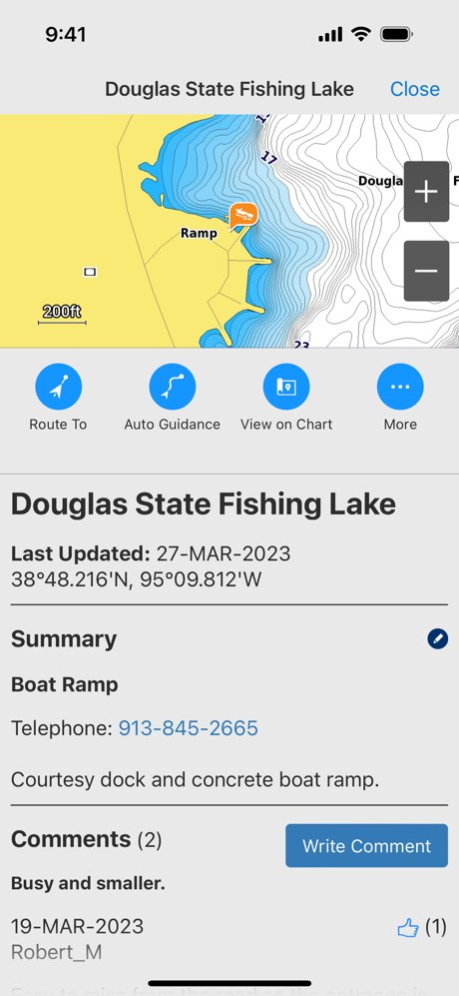


The free ActiveCaptain app creates a powerful connection between your compatible mobile device and Garmin chartplotter, charts, maps and the boating community. Whether you use your Garmin products for cruising, fishing, sailing or diving, this all-in-one app will help you enjoy your time on the water.
Just pair the app with your compatible chartplotter to wirelessly transfer and access charts and maps, software updates, routes, waypoints and helpful feedback from the ActiveCaptain Community. And, with the purchase of the OnDeck(TM) hub(1), you can track and monitor your boat from virtually anywhere.
Please note that this app is intended for Garmin chartplotter owners and is not recommended for use as a stand-alone navigational app.
FEATURES AVAILABLE:
- ONECHART(TM):
> New Garmin Navionics+(TM) and premium Garmin Navionics Vision+(TM) cartography, featuring a Navionics(R) style appearance, advanced Auto Guidance+(TM) technology(2) and a one-year subscription to daily updates, is available now for North America and Europe, and coming soon to the rest of the world.
Purchase our newest-generation charts or legacy BlueChart(R) g3 charts from your mobile device, and upload them to registered Garmin chartplotters on your vessel.
You will get exceptional coverage, clarity and detail with charts that feature integrated Garmin and Navionics data and much more. Plus, the NOAA raster cartography(3) and premium features can be downloaded for free through the ActiveCaptain app. Visit Garmin.com/marinemaps.
- PLAN A TRIP: Plan your trip, or e-scout a new fishing spot before you’re on the water. Then, transfer your data to your chartplotter where you can view your routes and waypoints.
- USER DATA SYNC: Automatically back up and sync your data between your chartplotter and the ActiveCaptain app.
- ACTIVECAPTAIN COMMUNITY: Join a community of boaters to get up-to-date feedback on marinas, boat ramps and other points of interest (POI). Check ratings, read reviews, and view pictures of POIs to make informed decisions on the water. Contribute your own POI, reviews and pictures from your compatible mobile device.
- CONTROL YOUR CHARTPLOTTER: Using the built-in Helm(TM) feature, the ActiveCaptain app lets you view and control your compatible(4) chartplotter from your smartphone or tablet, even when someone else is at the helm(5).
- EASY SOFTWARE UPDATES: Receive notifications about software updates from the app, and update your chartplotter wirelessly.
- ONDECK HUB: Use the ActiveCaptain app to track, monitor and control any number of switches with the OnDeck system(1) from nearly anywhere. Door open? Bilge running? Peace of mind comes in the form of text alerts and updates.
- GARMIN QUICKDRAWTM COMMUNITY: Download the latest 1’ HD contour maps shared by your fellow boaters, and sync with your chartplotter. You can also upload your own Quickdraw Contours map data.
- SMART NOTIFICATIONS: Connect the app to your chartplotter, and turn on smart notifications(4) to see calls, text messages and more on the chartplotter display while your phone is somewhere safe and dry.
FOOTNOTES
1)OnDeck hub sold separately and requires an active subscription plan
2)Auto Guidance+ is for planning purposes only and does not replace safe navigation operations
3)NOAA raster cartography cannot be viewed on echoMAP(TM) CHIRP and ECHOMAP(TM) Plus combos but can be viewed on mobile devices via the ActiveCaptain mobile app
4)Helm feature is not compatible with ECHOMAP series chartplotters
5)Check device compatibility on the ActiveCaptain app web page; visit https://www.garmin.com/c/marine/marine-apps/
End User License Agreement: https://www.garmin.com/en-US/legal/marine-mobile-eula/
Version History Bug fixing and optimization 45.0 Sep 28 Bug fixing and optimization 44.0 Jun 25 - Improved chart handling: The lake level can now be set independently from the vessel position
- Bug fixing and optimization 43.0 Apr 1 - Improved device registration workflow
- Bug fixing and optimization 42.0 Jan 7 Bug fixing and optimization 41.0 10/22/2025 Bug fixing and optimization 40.1 08/20/2025 - OnDeck now displays sensor data for up to 10 years and allows to view two sensors on the same graph
- Bug fixing and optimization 40.0 06/25/2025 Bug fixes and performance improvements 39.0 04/02/2025 - Auto Guidance+™ improvements by sorting and grouping hazards along the route
- Bug fixing and optimization 38.0 01/08/2025 Bug fixing and optimization 37.1 10/22/2024 - View seabed areas in an updated color palette along with details about the nature of the sea floor such as sand, mud, rock or vegetation. Seabed areas menu option will display only where seabed area content exists. Look for new seabed areas content coming for European coverage areas
- Bug fixing and optimization 37.0 10/07/2024 - ActiveCaptain can now receive a point of interest or position from other apps
- Text display improvements in the map view
- Bug fixes and performance improvements 36.1 07/16/2024 - Positions or POIs marked in 'Google Maps' or 'Apple Maps' can now be shared with ActiveCaptain and displayed in the app
- Text display improvements in the map view
- Bug fixes and performance improvements 36.0 07/01/2024 Bugfixes and performance improvements 35.1 04/29/2024 - New 'Vessel Settings' menu
- Enhanced Telematics functionality (Battery Monitoring, Sensor Graphs for Engine Data)
- Bugfixes and performance improvements 35.0 04/08/2024 - Updated UI
- Bugfixes and performance improvements 34.0 01/09/2024 - Auto Guidance routing has been optimized.
- Improvements with data transfer to Garmin marine devices.
- The app icon and splash screen can now be configured to match the vessel manufacturer.
- Various improvements for alarms and sensor data (Telematics).
- Bug fixes and performance improvements. 33.0 10/16/2023 - Bugfixes and performance improvements 32.1 07/13/2023 - Software updates can now be downloaded while being connected to chartplotter Wi-Fi
- Bugfixes and performance improvements 32.0 07/07/2023 - Bugfixes and performance improvements 31.1 05/16/2023 Bugfixes and performance improvements 31.0 04/11/2023 - Software updates can now be downloaded while being connected to chartplotter Wi-Fi
- Bugfixes and performance improvements 30.0 01/11/2023 Bugfixes and performance improvements 29.0 09/28/2022 Bugfixes and performance improvements 28.0 06/27/2022 Now you can track, monitor and control any number of switches you need on the vessel via the OnDeck system within the ActiveCaptain® app.
> Supports third party digital switching interfaces with offboard switch control via the ActiveCaptain® app.
Auto Download Setting – This is a new setting that lets you enable automatic downloads of marine device software updates. 27.0 04/11/2022
About ActiveCaptain®
The company that develops ActiveCaptain® is Garmin International. The latest version released by its developer is 45.0.
To install ActiveCaptain® on your iOS device, just click the green Continue To App button above to start the installation process. The app is listed on our website since 2026-10-15 and was downloaded 0 times. We have already checked if the download link is safe, however for your own protection we recommend that you scan the downloaded app with your antivirus. Your antivirus may detect the ActiveCaptain® as malware if the download link is broken.
How to install ActiveCaptain® on your iOS device:
- Click on the Continue To App button on our website. This will redirect you to the App Store.
- Once the ActiveCaptain® is shown in the iTunes listing of your iOS device, you can start its download and installation. Tap on the GET button to the right of the app to start downloading it.
- If you are not logged-in the iOS appstore app, you'll be prompted for your your Apple ID and/or password.
- After ActiveCaptain® is downloaded, you'll see an INSTALL button to the right. Tap on it to start the actual installation of the iOS app.
- Once installation is finished you can tap on the OPEN button to start it. Its icon will also be added to your device home screen.
Program Details
System requirements
Download information
Pricing
Version History
version 45.0
posted on 2026-10-15
Version History Bug fixing and optimization 45.0 Sep 28 Bug fixing and optimization 44.0 Jun 25 - Improved chart handling: The lake level can now be set independently from the vessel position
- Bug fixing and optimization 43.0 Apr 1 - Improved device registration workflow
- Bug fixing and optimization 42.0 Jan 7 Bug fixing and optimization 41.0 10/22/2025 Bug fixing and optimization 40.1 08/20/2025 - OnDeck now displays sensor data for up to 10 years and allows to view two sensors on the same graph
- Bug fixing and optimization 40.0 06/25/2025 Bug fixes and performance improvements 39.0 04/02/2025 - Auto Guidance+™ improvements by sorting and grouping hazards along the route
- Bug fixing and optimization 38.0 01/08/2025 Bug fixing and optimization 37.1 10/22/2024 - View seabed areas in an updated color palette along with details about the nature of the sea floor such as sand, mud, rock or vegetation. Seabed areas menu option will display only where seabed area content exists. Look for new seabed areas content coming for European coverage areas
- Bug fixing and optimization 37.0 10/07/2024 - ActiveCaptain can now receive a point of interest or position from other apps
- Text display improvements in the map view
- Bug fixes and performance improvements 36.1 07/16/2024 - Positions or POIs marked in 'Google Maps' or 'Apple Maps' can now be shared with ActiveCaptain and displayed in the app
- Text display improvements in the map view
- Bug fixes and performance improvements 36.0 07/01/2024 Bugfixes and performance improvements 35.1 04/29/2024 - New 'Vessel Settings' menu
- Enhanced Telematics functionality (Battery Monitoring, Sensor Graphs for Engine Data)
- Bugfixes and performance improvements 35.0 04/08/2024 - Updated UI
- Bugfixes and performance improvements 34.0 01/09/2024 - Auto Guidance routing has been optimized.
- Improvements with data transfer to Garmin marine devices.
- The app icon and splash screen can now be configured to match the vessel manufacturer.
- Various improvements for alarms and sensor data (Telematics).
- Bug fixes and performance improvements. 33.0 10/16/2023 - Bugfixes and performance improvements 32.1 07/13/2023 - Software updates can now be downloaded while being connected to chartplotter Wi-Fi
- Bugfixes and performance improvements 32.0 07/07/2023 - Bugfixes and performance improvements 31.1 05/16/2023 Bugfixes and performance improvements 31.0 04/11/2023 - Software updates can now be downloaded while being connected to chartplotter Wi-Fi
- Bugfixes and performance improvements 30.0 01/11/2023 Bugfixes and performance improvements 29.0 09/28/2022 Bugfixes and performance improvements 28.0 06/27/2022 Now you can track, monitor and control any number of switches you need on the vessel via the OnDeck system within the ActiveCaptain® app.
> Supports third party digital switching interfaces with offboard switch control via the ActiveCaptain® app.
Auto Download Setting – This is a new setting that lets you enable automatic downloads of marine device software updates. 27.0 04/11/2022
version 45.0
posted on 2026-10-01
Version History Bug fixing and optimization 45.0 3d ago Bug fixing and optimization 44.0 Jun 25 - Improved chart handling: The lake level can now be set independently from the vessel position
- Bug fixing and optimization 43.0 Apr 1 - Improved device registration workflow
- Bug fixing and optimization 42.0 Jan 7 Bug fixing and optimization 41.0 10/22/2025 Bug fixing and optimization 40.1 08/20/2025 - OnDeck now displays sensor data for up to 10 years and allows to view two sensors on the same graph
- Bug fixing and optimization 40.0 06/25/2025 Bug fixes and performance improvements 39.0 04/02/2025 - Auto Guidance+™ improvements by sorting and grouping hazards along the route
- Bug fixing and optimization 38.0 01/08/2025 Bug fixing and optimization 37.1 10/22/2024 - View seabed areas in an updated color palette along with details about the nature of the sea floor such as sand, mud, rock or vegetation. Seabed areas menu option will display only where seabed area content exists. Look for new seabed areas content coming for European coverage areas
- Bug fixing and optimization 37.0 10/07/2024 - ActiveCaptain can now receive a point of interest or position from other apps
- Text display improvements in the map view
- Bug fixes and performance improvements 36.1 07/16/2024 - Positions or POIs marked in 'Google Maps' or 'Apple Maps' can now be shared with ActiveCaptain and displayed in the app
- Text display improvements in the map view
- Bug fixes and performance improvements 36.0 07/01/2024 Bugfixes and performance improvements 35.1 04/29/2024 - New 'Vessel Settings' menu
- Enhanced Telematics functionality (Battery Monitoring, Sensor Graphs for Engine Data)
- Bugfixes and performance improvements 35.0 04/08/2024 - Updated UI
- Bugfixes and performance improvements 34.0 01/09/2024 - Auto Guidance routing has been optimized.
- Improvements with data transfer to Garmin marine devices.
- The app icon and splash screen can now be configured to match the vessel manufacturer.
- Various improvements for alarms and sensor data (Telematics).
- Bug fixes and performance improvements. 33.0 10/16/2023 - Bugfixes and performance improvements 32.1 07/13/2023 - Software updates can now be downloaded while being connected to chartplotter Wi-Fi
- Bugfixes and performance improvements 32.0 07/07/2023 - Bugfixes and performance improvements 31.1 05/16/2023 Bugfixes and performance improvements 31.0 04/11/2023 - Software updates can now be downloaded while being connected to chartplotter Wi-Fi
- Bugfixes and performance improvements 30.0 01/11/2023 Bugfixes and performance improvements 29.0 09/28/2022 Bugfixes and performance improvements 28.0 06/27/2022 Now you can track, monitor and control any number of switches you need on the vessel via the OnDeck system within the ActiveCaptain® app.
> Supports third party digital switching interfaces with offboard switch control via the ActiveCaptain® app.
Auto Download Setting – This is a new setting that lets you enable automatic downloads of marine device software updates. 27.0 04/11/2022
version 44.0
posted on 2026-09-24
Version History Bug fixing and optimization 44.0 Jun 25 - Improved chart handling: The lake level can now be set independently from the vessel position
- Bug fixing and optimization 43.0 Apr 1 - Improved device registration workflow
- Bug fixing and optimization 42.0 Jan 7 Bug fixing and optimization 41.0 10/22/2025 Bug fixing and optimization 40.1 08/20/2025 - OnDeck now displays sensor data for up to 10 years and allows to view two sensors on the same graph
- Bug fixing and optimization 40.0 06/25/2025 Bug fixes and performance improvements 39.0 04/02/2025 - Auto Guidance+™ improvements by sorting and grouping hazards along the route
- Bug fixing and optimization 38.0 01/08/2025 Bug fixing and optimization 37.1 10/22/2024 - View seabed areas in an updated color palette along with details about the nature of the sea floor such as sand, mud, rock or vegetation. Seabed areas menu option will display only where seabed area content exists. Look for new seabed areas content coming for European coverage areas
- Bug fixing and optimization 37.0 10/07/2024 - ActiveCaptain can now receive a point of interest or position from other apps
- Text display improvements in the map view
- Bug fixes and performance improvements 36.1 07/16/2024 - Positions or POIs marked in 'Google Maps' or 'Apple Maps' can now be shared with ActiveCaptain and displayed in the app
- Text display improvements in the map view
- Bug fixes and performance improvements 36.0 07/01/2024 Bugfixes and performance improvements 35.1 04/29/2024 - New 'Vessel Settings' menu
- Enhanced Telematics functionality (Battery Monitoring, Sensor Graphs for Engine Data)
- Bugfixes and performance improvements 35.0 04/08/2024 - Updated UI
- Bugfixes and performance improvements 34.0 01/09/2024 - Auto Guidance routing has been optimized.
- Improvements with data transfer to Garmin marine devices.
- The app icon and splash screen can now be configured to match the vessel manufacturer.
- Various improvements for alarms and sensor data (Telematics).
- Bug fixes and performance improvements. 33.0 10/16/2023 - Bugfixes and performance improvements 32.1 07/13/2023 - Software updates can now be downloaded while being connected to chartplotter Wi-Fi
- Bugfixes and performance improvements 32.0 07/07/2023 - Bugfixes and performance improvements 31.1 05/16/2023 Bugfixes and performance improvements 31.0 04/11/2023 - Software updates can now be downloaded while being connected to chartplotter Wi-Fi
- Bugfixes and performance improvements 30.0 01/11/2023 Bugfixes and performance improvements 29.0 09/28/2022 Bugfixes and performance improvements 28.0 06/27/2022 Now you can track, monitor and control any number of switches you need on the vessel via the OnDeck system within the ActiveCaptain® app.
> Supports third party digital switching interfaces with offboard switch control via the ActiveCaptain® app.
Auto Download Setting – This is a new setting that lets you enable automatic downloads of marine device software updates. 27.0 04/11/2022 Bugfixes and performance improvements 26.1 03/01/2022
version 44.0
posted on 2026-06-28
Version History Bug fixing and optimization 44.0 2d ago - Improved chart handling: The lake level can now be set independently from the vessel position
- Bug fixing and optimization 43.0 Apr 1 - Improved device registration workflow
- Bug fixing and optimization 42.0 Jan 7 Bug fixing and optimization 41.0 10/22/2025 Bug fixing and optimization 40.1 08/20/2025 - OnDeck now displays sensor data for up to 10 years and allows to view two sensors on the same graph
- Bug fixing and optimization 40.0 06/25/2025 Bug fixes and performance improvements 39.0 04/02/2025 - Auto Guidance+™ improvements by sorting and grouping hazards along the route
- Bug fixing and optimization 38.0 01/08/2025 Bug fixing and optimization 37.1 10/22/2024 - View seabed areas in an updated color palette along with details about the nature of the sea floor such as sand, mud, rock or vegetation. Seabed areas menu option will display only where seabed area content exists. Look for new seabed areas content coming for European coverage areas
- Bug fixing and optimization 37.0 10/07/2024 - ActiveCaptain can now receive a point of interest or position from other apps
- Text display improvements in the map view
- Bug fixes and performance improvements 36.1 07/16/2024 - Positions or POIs marked in 'Google Maps' or 'Apple Maps' can now be shared with ActiveCaptain and displayed in the app
- Text display improvements in the map view
- Bug fixes and performance improvements 36.0 07/01/2024 Bugfixes and performance improvements 35.1 04/29/2024 - New 'Vessel Settings' menu
- Enhanced Telematics functionality (Battery Monitoring, Sensor Graphs for Engine Data)
- Bugfixes and performance improvements 35.0 04/08/2024 - Updated UI
- Bugfixes and performance improvements 34.0 01/09/2024 - Auto Guidance routing has been optimized.
- Improvements with data transfer to Garmin marine devices.
- The app icon and splash screen can now be configured to match the vessel manufacturer.
- Various improvements for alarms and sensor data (Telematics).
- Bug fixes and performance improvements. 33.0 10/16/2023 - Bugfixes and performance improvements 32.1 07/13/2023 - Software updates can now be downloaded while being connected to chartplotter Wi-Fi
- Bugfixes and performance improvements 32.0 07/07/2023 - Bugfixes and performance improvements 31.1 05/16/2023 Bugfixes and performance improvements 31.0 04/11/2023 - Software updates can now be downloaded while being connected to chartplotter Wi-Fi
- Bugfixes and performance improvements 30.0 01/11/2023 Bugfixes and performance improvements 29.0 09/28/2022 Bugfixes and performance improvements 28.0 06/27/2022 Now you can track, monitor and control any number of switches you need on the vessel via the OnDeck system within the ActiveCaptain® app.
> Supports third party digital switching interfaces with offboard switch control via the ActiveCaptain® app.
Auto Download Setting – This is a new setting that lets you enable automatic downloads of marine device software updates. 27.0 04/11/2022 Bugfixes and performance improvements 26.1 03/01/2022
version 43.0
posted on 2026-05-27
Version History - Improved chart handling: The lake level can now be set independently from the vessel position
- Bug fixing and optimization 43.0 Apr 1 - Improved device registration workflow
- Bug fixing and optimization 42.0 Jan 7 Bug fixing and optimization 41.0 10/22/2025 Bug fixing and optimization 40.1 08/20/2025 - OnDeck now displays sensor data for up to 10 years and allows to view two sensors on the same graph
- Bug fixing and optimization 40.0 06/25/2025 Bug fixes and performance improvements 39.0 04/02/2025 - Auto Guidance+™ improvements by sorting and grouping hazards along the route
- Bug fixing and optimization 38.0 01/08/2025 Bug fixing and optimization 37.1 10/22/2024 - View seabed areas in an updated color palette along with details about the nature of the sea floor such as sand, mud, rock or vegetation. Seabed areas menu option will display only where seabed area content exists. Look for new seabed areas content coming for European coverage areas
- Bug fixing and optimization 37.0 10/07/2024 - ActiveCaptain can now receive a point of interest or position from other apps
- Text display improvements in the map view
- Bug fixes and performance improvements 36.1 07/16/2024 - Positions or POIs marked in 'Google Maps' or 'Apple Maps' can now be shared with ActiveCaptain and displayed in the app
- Text display improvements in the map view
- Bug fixes and performance improvements 36.0 07/01/2024 Bugfixes and performance improvements 35.1 04/29/2024 - New 'Vessel Settings' menu
- Enhanced Telematics functionality (Battery Monitoring, Sensor Graphs for Engine Data)
- Bugfixes and performance improvements 35.0 04/08/2024 - Updated UI
- Bugfixes and performance improvements 34.0 01/09/2024 - Auto Guidance routing has been optimized.
- Improvements with data transfer to Garmin marine devices.
- The app icon and splash screen can now be configured to match the vessel manufacturer.
- Various improvements for alarms and sensor data (Telematics).
- Bug fixes and performance improvements. 33.0 10/16/2023 - Bugfixes and performance improvements 32.1 07/13/2023 - Software updates can now be downloaded while being connected to chartplotter Wi-Fi
- Bugfixes and performance improvements 32.0 07/07/2023 - Bugfixes and performance improvements 31.1 05/16/2023 Bugfixes and performance improvements 31.0 04/11/2023 - Software updates can now be downloaded while being connected to chartplotter Wi-Fi
- Bugfixes and performance improvements 30.0 01/11/2023 Bugfixes and performance improvements 29.0 09/28/2022 Bugfixes and performance improvements 28.0 06/27/2022 Now you can track, monitor and control any number of switches you need on the vessel via the OnDeck system within the ActiveCaptain® app.
> Supports third party digital switching interfaces with offboard switch control via the ActiveCaptain® app.
Auto Download Setting – This is a new setting that lets you enable automatic downloads of marine device software updates. 27.0 04/11/2022 Bugfixes and performance improvements 26.1 03/01/2022 [+] New Garmin Navionics+™ chart products now available for purchase in North America, featuring:
> Navionics® style appearance
> Advanced Auto Guidance+™ technology(1)
> Included one-year subscription to daily chart updates
[+] The app now has improved chart download and chart deletion capabilities
(1) Auto Guidance+ is for planning purposes only and does not replace safe navigation operations 26.0 01/26/2022
version 42.0
posted on 2026-01-07
- Improved device registration workflow
- Bug fixing and optimization
version 40.1
posted on 2025-08-20
Aug 20, 2025
Version 40.1
Bug fixing and optimization
version 40.0
posted on 2025-06-25
Jun 25, 2025
Version 40.0
- OnDeck now displays sensor data for up to 10 years and allows to view two sensors on the same graph
- Bug fixing and optimization
version 39.0
posted on 2025-04-02
Apr 2, 2025
Version 39.0
Bug fixes and performance improvements
version 38.0
posted on 2025-01-08
Jan 8, 2025
Version 38.0
- Auto Guidance+™ improvements by sorting and grouping hazards along the route
- Bug fixing and optimization
Disclaimer
Official App Store Link
We do not host ActiveCaptain® on our servers. We did not scan it for viruses, adware, spyware or other type of malware. This app is hosted by Apple and passed their terms and conditions to be listed there. We recommend caution when installing it.
The App Store link for ActiveCaptain® is provided to you by apps112.com without any warranties, representations or guarantees of any kind, so access it at your own risk.
If you have questions regarding this particular app contact the publisher directly. For questions about the functionalities of apps112.com contact us.
